My Journey Through Setting Up My First CI/CD Pipeline for a Python Library
Introduction
Welcome to my blog, where I want to share my first encounter with building a Continuous Integration and Continuous Deployment (CI/CD) pipeline. This isn’t just about automating processes; it’s about embracing practices and tools that are important in modern software development. If you’re a developer or have an interest in Python, CI/CD, or software engineering practices, you’ll find some valuable insights here.
Background
In the data science team where I work, we are developing a Python library for analyzing measured PVOUT time series data. It has come to a stage where we would like to share it inside the company. The challenge is clear: manual sharing of the library would be far from ideal. It would lead to inefficiencies, slow down development, and create a traceability nightmare. This is where CI/CD pipelines shine.
Goals of the CI/CD Pipeline
The primary goal of setting up this CI/CD pipeline is to efficiently share a Python software library with other developers and users. It was all about building a robust system that would take our Python library from code to deployment seamlessly and efficiently. Here’s a breakdown of what I aimed to achieve:
-
Building the Package: The first step was to automate the process of turning our library’s code into a distributable Python package.
-
Testing the Build: Once the package is built, the next goal is to thoroughly test it.
-
Running Code Analysis: This involves checking for coding standards, identifying potential errors, and ensuring the overall health of the codebase.
-
Publishing the Package: This step ensures that the latest version of our library is always accessible to our colleagues, and hassle-free.
In the following sections, we’ll delve deeper into each stage of the pipeline, the challenges faced, the solutions implemented, and the lessons learned along the way.
Pipeline Overview
Let’s take a closer look at the key stages of this pipeline and the roles they played in achieving our project goals.
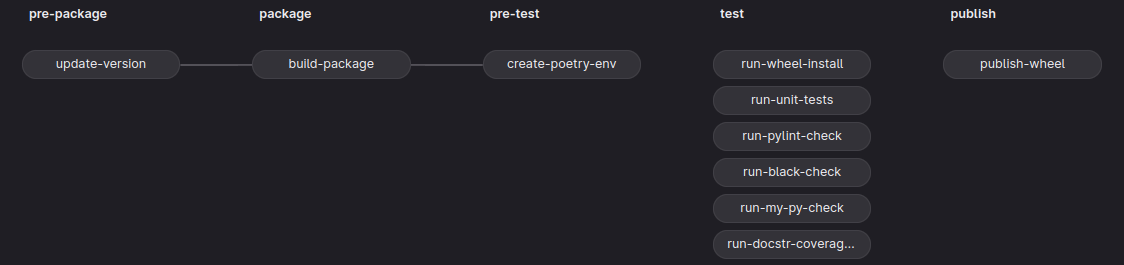
The whole pipeline consists of the following stages pre-package, package, pre-test, test, and publish. Each stage represents a building block of the CI/CD pipeline and is executed from left to right. This means that by default a certain stage begins running after the successful completion of the preceding stage. We can overwrite this serial execution by using the needs keyword; more about that later.
Each stage is composed of jobs that run by default concurrently if enough runners – Gitlab applications that run a job in an isolated environment – are available. If every job of a stage passes then the jobs of the next following stage are executed.
The purpose of the stages and jobs of the pipeline depicted in the above picture is to automate the process of packaging, testing, and publishing the functionalities of the source code to users through the Pythons packaging ecosystem. To facilitate this process I have made use of a tool called Poetry; it is a tool for packaging and dependency management.
Detailed Pipeline Walkthrough
So, let’s start to build the above pipeline from scratch – if you are not keen on a step-by-step approach, you can jump straight to the full pipeline definition .gitlab-ci.yml at the end of this blog. First, we start with the backbone, that is define the stages and jobs.
# .gitlab-ci.yml

# define the order of the stages
stages:
  - pre-package
  - package
  - pre-test
  - test
  - publish

# define here your local variables
variables:
  VARIABLE_1: 'Hi'
  VARIABLE_2: 'Ha'
  VARIABLE_1: 'Ho'

update-version:
  stage: pre-package
  script:
    - echo "Version update complete."

build-package:
  stage: package
  script:
    - echo "Package build complete."

create-poetry-env:
  stage: pre-test
  needs: [update-version]
  script:
    - echo "Poetry env creation complete."

.poetry-env-management:
  before_script:
    - echo "Poetry env configs."

run-wheel-install:
  stage: test
  script:
    - echo "Wheel install complete."

run-unit-tests:
  stage: test
  script:
    - echo "Unit tests complete."

run-pylint-check:
  stage: test
  script:
    - echo "Pylint check complete"

run-black-check:
  stage: test
  needs: []
  script:
    - echo "Black check complete"

run-my-py-check:
  stage: test
  script:
    - echo "MyPy check complete"

run-docstr-coverage-check:
  stage: test
  script:
    - echo "Docstring coverage check complete"

publish-wheel:
  stage: publish
  script:
    - echo "Publish"
So far this gives us a structure of the pipeline. Each job has a keyword stage that affiliates a job to a specific stage defined under the stages keyword. I mentioned above that we can alter the default execution order of the jobs. Well, here I use the needs keyword to alter the order of a specific job by specifying the job names in brackets that must have passed before that specific job runs. If the brackets are empty, then the job runs immediately at the start of the pipeline. Let’s now have a closer look at each job individually.
Update Version
update-version:
  stage: pre-package
  image: duffn/python-poetry:3.10-slim
  script:
    - 'python scripts/update_version.py
          ${CI_PIPELINE_ID}
          ${CI_COMMIT_REF_NAME}
          >${VERSION_PATH}'
    - poetry version $(cat ${VERSION_PATH})
    - echo "Version update complete."
  artifacts:
    paths:
      - ${VERSION_PATH}
      - pyproject.toml
The purpose of this stage is to update the package version every time we make a release of our library. For our project we update the version in two places: in a file under the variable VERSION_PATH that is part of the source code and in the project’s pyproject.toml file using Poetry. All this is done under the script keyword which is the part of the job that gets executed inside a Docker container defined by a specific image under the image keyword. The purpose of the image is to define an execution environment for the shell commands of the job’s script. This image is downloaded every time the job is run. Therefore, to speed up the pipeline, it is convenient to have an image that is as small as possible containing only software that is necessary for executing the script. In this job we just need Poetry, so we take a small image that contains only the necessary software for running Poetry.
Sometimes, we need to collect the results of a job. In our case, we need the updated pyproject.toml file and the file under VERSION_PATH for the jobs in the subsequent stages. This is achieved by defining the relative paths of the files inside the project under the artifacts keyword. The artifacts can also be downloaded in GitLab’s UI for inspection.
Build Package
build-package:
  stage: package
  image: duffn/python-poetry:3.10-slim
  script:
    - poetry build
    - echo "Package ${INDEX_NAME} v$(cat ${VERSION_PATH}) build complete."
  artifacts:
    paths:
      - ${DIST_DIR}
In this stage, we build the package according to the recipe inside pyproject.toml and with the help of Poetry. And that’s it! We build our package  .
.
Create Poetry Environment
create-poetry-env:
  stage: pre-test
  image: duffn/python-poetry:3.10-slim
  needs: [update-version]
  dependencies:
    - update-version
  cache: &poetry-env-cache
    key: poetry-env
    paths:
      - ${POETRY_VENV_DIR}
    policy: pull-push
  script:
    - poetry config virtualenvs.in-project true  # creates .venv in project dir
    - poetry config virtualenvs.path ${POETRY_VENV_DIR}
    - poetry config http-basic.nexus ${NEXUS_USERNAME} ${NEXUS_PASSWORD}
    - poetry config repositories.nexus ${NEXUS_INDEX_URL}
    - poetry install --with dev --all-extras
    - echo "Poetry env creation complete."
The pre-test stage serves as a preparation for the subsequent stage, namely test. In the pre-test stage, we want to create a reproducible environment and load it onto a server from which we can retrieve it for later usage. Remember that each job runs in an isolated environment. So, when a job finishes, then all its content is gone. There are two ways to store files in a GitLab CI/CD pipeline. One way we have already seen – artifacts. By default, all artifacts from the previous stages are downloaded. To prevent that and download only those needed for the current job we specify the jobs’ artifacts to be downloaded under the dependencies keyword.
Artifacts are fine for small files and sharing between stages. However, we need something that can potentially be used for multiple pipeline runs. This is where caches come as a convenient option. In this job, we store the whole virtual environment and its installed dependencies in Poetry’s cache which we define through the configuration setting in the above script. The cache is then stored under a specific key, namely key: poetry-env, that can be used to retrieve the content of the cache in all following jobs and pipelines. The behavior when a cache is uploaded and downloaded can be managed by the policy keyword. With the project dependencies installed and stored, we can proceed with the next stage.
Testing and Analysis
In this stage, we run test and code analysis tools against the installed library from the previous stage. I won’t go into detail about every single job, so I’m going to mention only the job that runs the unit tests.
.poetry-env-management:
  image: duffn/python-poetry:3.10-slim
  cache:
    <<: *poetry-env-cache
    policy: pull
  before_script:
    - poetry config virtualenvs.in-project true  # creates .venv in project dir
    - poetry config virtualenvs.path ${POETRY_VENV_DIR}
    - poetry config http-basic.nexus ${NEXUS_USERNAME} ${NEXUS_PASSWORD}
    - poetry config repositories.nexus ${NEXUS_INDEX_URL}

run-unit-tests:
  extends: .poetry-env-management
  stage: test
  dependencies: []
  script:
    - 'poetry run coverage run --source ${SOURCE_DIR} -m
        unittest discover -s ${TEST_DIR}'
    - poetry run coverage html -d coverage --skip-covered --skip-empty
    - echo "Unit tests complete."
  artifacts:
    paths:
      - coverage/
In this job, we make use of a so-called template job .poetry-env-management. The purpose of such jobs is to follow the DRY (don’t repeat yourself) rule and minimize repetitive code. Here, each time we extend the template in a certain job, first the before_script shell commands are executed before script. However, not just that is put in place of the run-unit-test job. Also, other configurations like image and cache are used from the template job. Another way to follow the DRY rule is through the & and << construct. With & we annotate a configuration and with << we say where to put it. All other conflicting configuration settings will be overridden like policy in this case is set from push-pull to pull.
Publishing
By now, you should have a fairly good understanding of how to build your first pipeline. For the sake of completeness, I just pin the last stage and let you observe if all makes sense for you so far  . Can you guess what the empty brackets for the caching keyword do?
publish-wheel:
  extends: .poetry-env-management
  stage: publish
  dependencies:
    - update-version
    - build-package
  cache: []
  script:
    # debug logging
    - ls -l dist/
    # On a strict release tag publish the package to pypi.org
    # Otherwise just log a message
    - '[[ ${CI_COMMIT_REF_NAME} =~ ${BASH_RELEASE_PATTERN} ]] &&
        poetry publish --repository nexus && echo "Publish to nexus." ||
        poetry publish --repository nexus --dry-run  && echo "Publish dry run."'
Maybe it is worth mentioning the reason behind doing the version update we have made in the first job. Here, we trigger the pipeline to publish a new package only if we tag the commit message with a unique package version ID. Otherwise, we tell Poetry not to publish the package to Nexus. This restricts the pipeline from publishing without increasing its version. Since every new build has also a new hash identifier, this can cause tools like Poetry that manage dependencies by semantic versioning through so-called lock files to have conflicts when installing the project dependencies into an environment with a modified hash identifier but not a modified package version.
And that’s it! You can find the complete pipeline with all its local variable definitions further below. Feel free to use it and adjust it for specific project needs.
Conclusion
In concluding my journey of building a CI/CD pipeline for a Python library, I’ve come to appreciate the transformative power of automation in software development. This process streamlined our build and deployment procedures, significantly improving efficiency and ensuring consistent quality in every release. Most importantly, this pipeline simplified the sharing of our work within the team, showcasing how CI/CD can be a game-changer for collaborative development.
I hope my journey through creating a CI/CD pipeline has provided you with insights and inspiration. Now, I’d love to hear from you! Whether you’re just starting with CI/CD or have your own experiences to share, let’s keep the learning going. Share your thoughts, challenges, or tips in the comments below.
Complete pipeline
stages:
  - pre-package
  - package
  - pre-test
  - test
  - publish


variables:
  NEXUS_INDEX_URL: ""
  NEXUS_USERNAME: ''
  NEXUS_PASSWORD: ''
  SOURCE_DIR: ''
  PACKAGE_NAME: ''
  INDEX_NAME: ''
  TEST_DIR: 'tests'
  VENV_DIR: 'env'
  POETRY_VENV_DIR: '.venv'  # only when poetry create in-project venvs
  DIST_DIR: 'dist'
  # This release pattern also explicitly ignores the "-dryrun" suffix.
  BASH_RELEASE_PATTERN: '^[0-9]+\.[0-9]+\.[0-9]+$'
  VERSION_PATH: ${SOURCE_DIR}/VERSION


update-version:
  stage: pre-package
  image: duffn/python-poetry:3.10-slim
  script:
    - 'python scripts/update_version.py
          ${CI_PIPELINE_ID}
          ${CI_COMMIT_REF_NAME}
          >${VERSION_PATH}'
    - poetry version $(cat ${VERSION_PATH})
    - echo "Version update complete."
  artifacts:
    expose_as: 'version'
    paths:
      - ${VERSION_PATH}
      - pyproject.toml


build-package:
  stage: package
  image: duffn/python-poetry:3.10-slim
  script:
    - poetry build
    - echo "Package ${INDEX_NAME} v$(cat ${VERSION_PATH}) build complete."
  artifacts:
    expose_as: 'package'
    paths:
      - ${DIST_DIR}


create-poetry-env:
  stage: pre-test
  image: duffn/python-poetry:3.10-slim
  needs: [update-version]
  dependencies:
    - update-version
  cache: &poetry-env-cache
    key: poetry-env
    paths:
      - ${POETRY_VENV_DIR}
    policy: pull-push
  script:
    - poetry config virtualenvs.in-project true  # creates .venv in project dir
    - poetry config virtualenvs.path ${POETRY_VENV_DIR}
    - poetry config http-basic.nexus ${NEXUS_USERNAME} ${NEXUS_PASSWORD}
    - poetry config repositories.nexus ${NEXUS_INDEX_URL}
    - poetry install --with dev --all-extras
    - echo "Poetry env creation complete."


.poetry-env-management:
  image: duffn/python-poetry:3.10-slim
  cache:
    <<: *poetry-env-cache
    policy: pull
  before_script:
    - poetry config virtualenvs.in-project true  # creates .venv in project dir
    - poetry config virtualenvs.path ${POETRY_VENV_DIR}
    - poetry config http-basic.nexus ${NEXUS_USERNAME} ${NEXUS_PASSWORD}
    - poetry config repositories.nexus ${NEXUS_INDEX_URL}


run-wheel-install:
  stage: test
  image: python:3.10-slim
  dependencies:
    - build-package
  cache:
    key: wheel-install
    paths:
      - ${VENV_DIR}
    policy: pull-push
  script:
    - 'if [ ! -d "${VENV_DIR}" ]; then pip install virtualenv;
        virtualenv ${VENV_DIR}; fi;'
    - source ${VENV_DIR}/bin/activate
    - 'pip install ${DIST_DIR}/sg_${PACKAGE_NAME}*.whl
        --index-url ${NEXUS_INDEX_URL}'
    - echo "Wheel install complete."


run-unit-tests:
  extends: .poetry-env-management
  stage: test
  dependencies: []
  script:
    - 'poetry run coverage run --source ${SOURCE_DIR} -m
        unittest discover -s ${TEST_DIR}'
    - poetry run coverage html -d coverage --skip-covered --skip-empty
    - echo "Unit tests complete."
  artifacts:
    paths:
      - coverage/


run-pylint-check:
  extends: .poetry-env-management
  allow_failure: true
  stage: test
  dependencies: []
  script:
    - 'poetry run pylint -j 0 --reports=y --recursive=y
        --output-format=text:pylint_report.txt,colorized
        ${SOURCE_DIR} ${TEST_DIR} 2>&1 || FAILED=true'
    - 'poetry run pylint -j 0 --output-format=pylint_report.CustomJsonReporter
        --load-plugins=pylint_report ${SOURCE_DIR} ${TEST_DIR} |
        poetry run pylint_report.py > pylint_report.html'
    - echo "Pylint check complete"
  artifacts:
    when: always
    expose_as: 'pylint_report'
    paths:
      - pylint_report.html
      - pylint_report.txt


run-black-check:
  allow_failure: true
  stage: test
  needs: []
  image: pyfound/black:latest_release
  script:
    - black --check ${SOURCE_DIR} ${TEST_DIR} 2>&1 | tee black_report.txt
    - echo "Black check complete"
  artifacts:
    when: always
    expose_as: 'black_report'
    paths:
      - black_report.txt


run-my-py-check:
  extends: .poetry-env-management
  allow_failure: true
  stage: test
  dependencies: []
  script:
    - poetry run mypy --html-report mypy_report ${SOURCE_DIR} ${TEST_DIR}
    - echo "MyPy check complete"
  artifacts:
    when: always
    expose_as: 'mypy_report'
    paths:
      - mypy_report/


run-docstr-coverage-check:
  extends: .poetry-env-management
  allow_failure: true
  stage: test
  dependencies: []
  script:
    - poetry run docstr-coverage ${SOURCE_DIR} 2>&1 | tee docstr-coverage.txt
    - echo "Docstring coverage check complete"
  artifacts:
    when: always
    expose_as: 'docstr_coverage'
    paths:
      - docstr-coverage.txt


publish-wheel:
  extends: .poetry-env-management
  stage: publish
  dependencies:
    - update-version
    - build-package
  cache: []
  script:
    # debug logging
    - ls -l dist/
    # On a strict release tag publish the package to pypi.org
    # Otherwise just log a message
    - '[[ ${CI_COMMIT_REF_NAME} =~ ${BASH_RELEASE_PATTERN} ]] &&
        poetry publish --repository nexus && echo "Publish to nexus." ||
        poetry publish --repository nexus --dry-run  && echo "Publish dry run."'